Money tracker for iPhone

Money flow in
every currency.

A calm and private money tracker for anyone ready to see where money goes and get it in order. No account, nothing to leak: all on your iPhone.
Coming soon to theApp Store See what moni does
No account No bank data to leak 30 languages
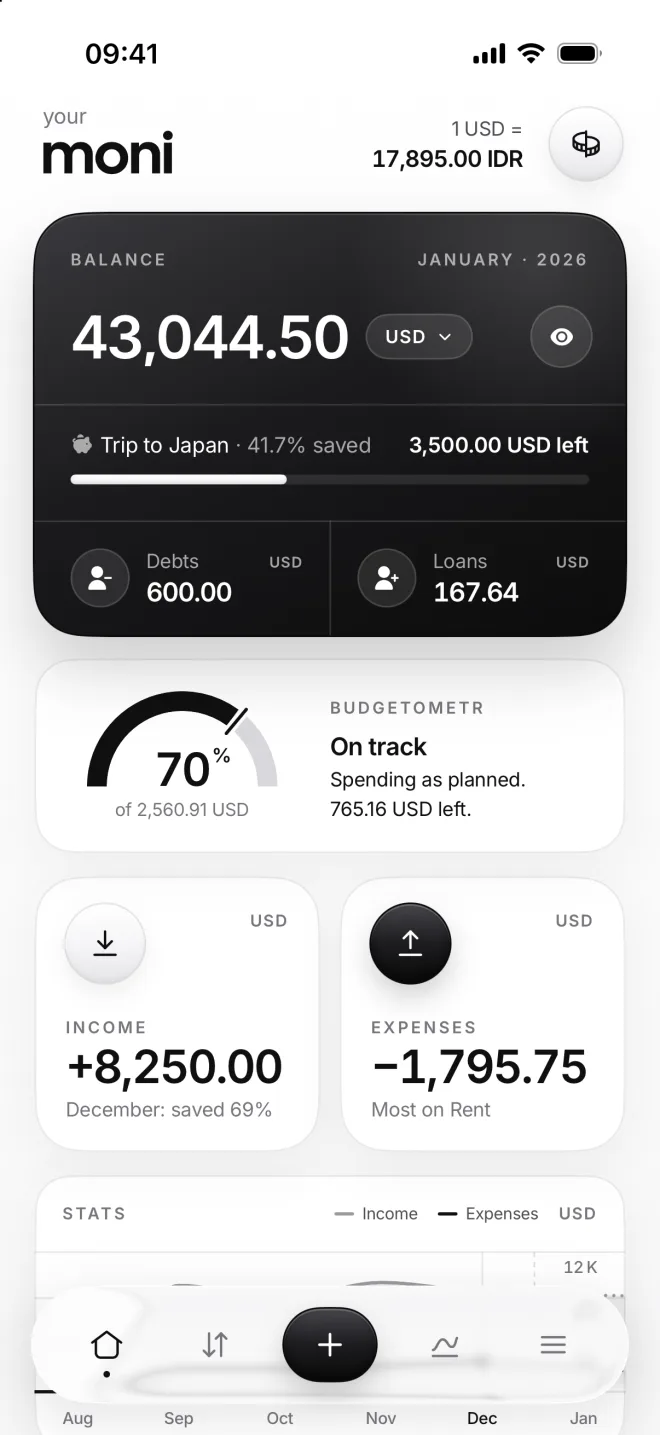
moni Home: balance, Budgetometr, income and expenses
Rent in 3 days: −21,000,000.00 IDRManage
1 — 2 — 3 — Done

From, to, how much. Added.

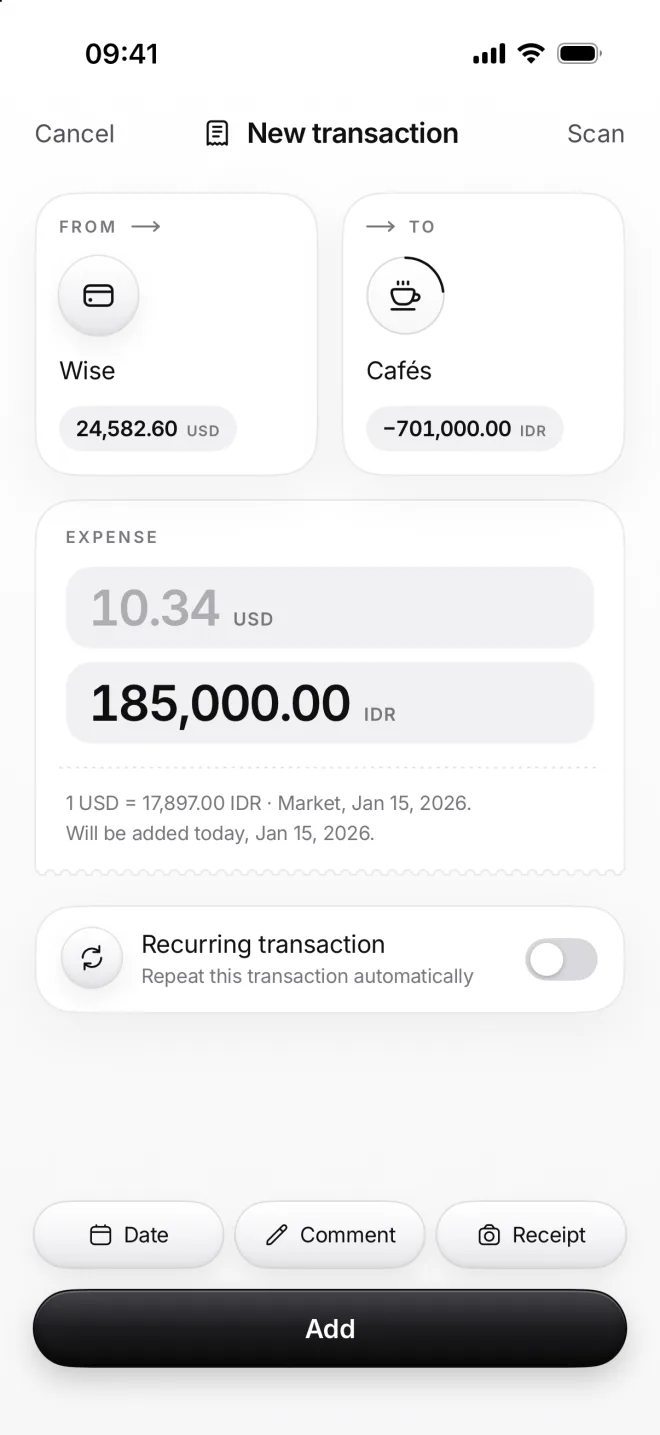
Every move of money in moni is one transaction from one place to another. Salary to your card, your card to a café, one account to another: pick both, type the amount, tap Add.
SalaryWiseIncome WiseBCATransfer BCACafésExpense
New transaction in two currencies: 185,000 IDR from a dollar card, 10.34 USD worked out at the day’s rate
New transaction: from Wise to Subscriptions, 15.99 USD, and Add
  1. 1
    FromWhere the money comes from: your salary, or a card, cash or bank account.
  2. 2
    ToWhere the money goes: an expense, like groceries or a café, or another account.
  3. 3
    How muchType the amount on the calculator built into the form. It can add up prices too.
  4. AddLast step. It shows up in Flow, and your balances and budget change at once.
10.34USD 185,000.00IDR
Two currencies

Type one amount and moni converts it at the day’s rate. Or type both, as charged.

Your categories, your icons.

Make your own categories, as many as you need, each with an icon from moni’s 144 or with any Apple emoji you like best.

New categoryCafés
On every plan
Ultrafast receipt scan

Or just snap a receipt. That’s it.

moni reads the total, the date and every item in under 10 seconds and sorts them into your categories. Food and home goods on one receipt become two separate transactions.

300 scans a month on every plan. Only the text goes to our AI partner, never stored. The photo stays on your iPhone.

Every currency

Dollars, rupiahs, euros. Even bitcoin.

165 currencies from central banks and 50 crypto coins. Pay in rupiahs from a dollar card, and moni keeps both amounts exactly as they were, with the exchange rate of that very day.

Exchange rates are built in, so you can check any rate without leaving moni. Charts go 10 years back, crypto 1 year.

Sample rates. In moni they update every day, crypto every hour.

Budgetometr

Are you on track? One look tells you.

A speedometer for your budget: the arc is what you’ve spent, the mark is where you should be.

BillsRent and subscriptions are paid at once. Paid means on plan.
Everyday spendingFood and taxis are spread over the month, day by day.
SurprisesA new phone counts as spent; moni won’t expect another.
0%
of 2,560.34 USD
Budgetometr Fresh start Nothing spent yet. 2,560.34 USD left.
Flow and Stats

See where it flows.

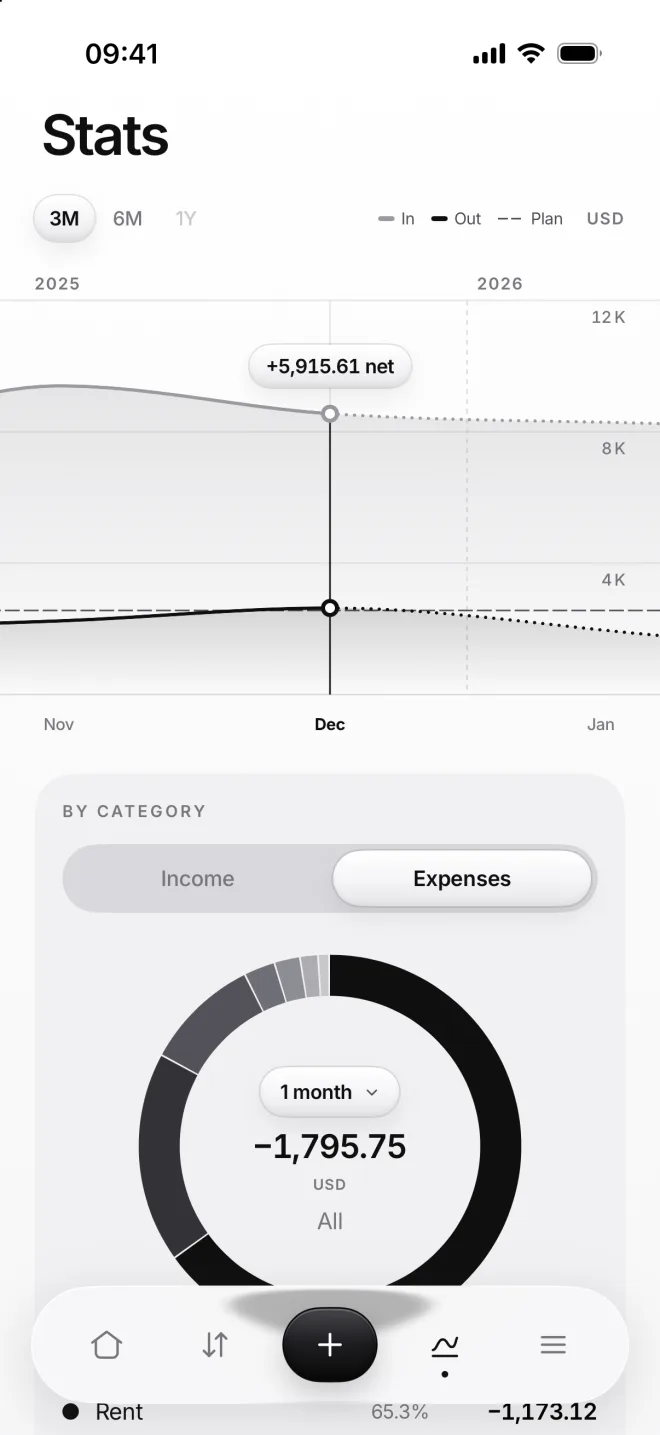
Every transaction moves money from one place to another: salary to your card, your card to groceries. Charts show what came in, what went out and what you kept.
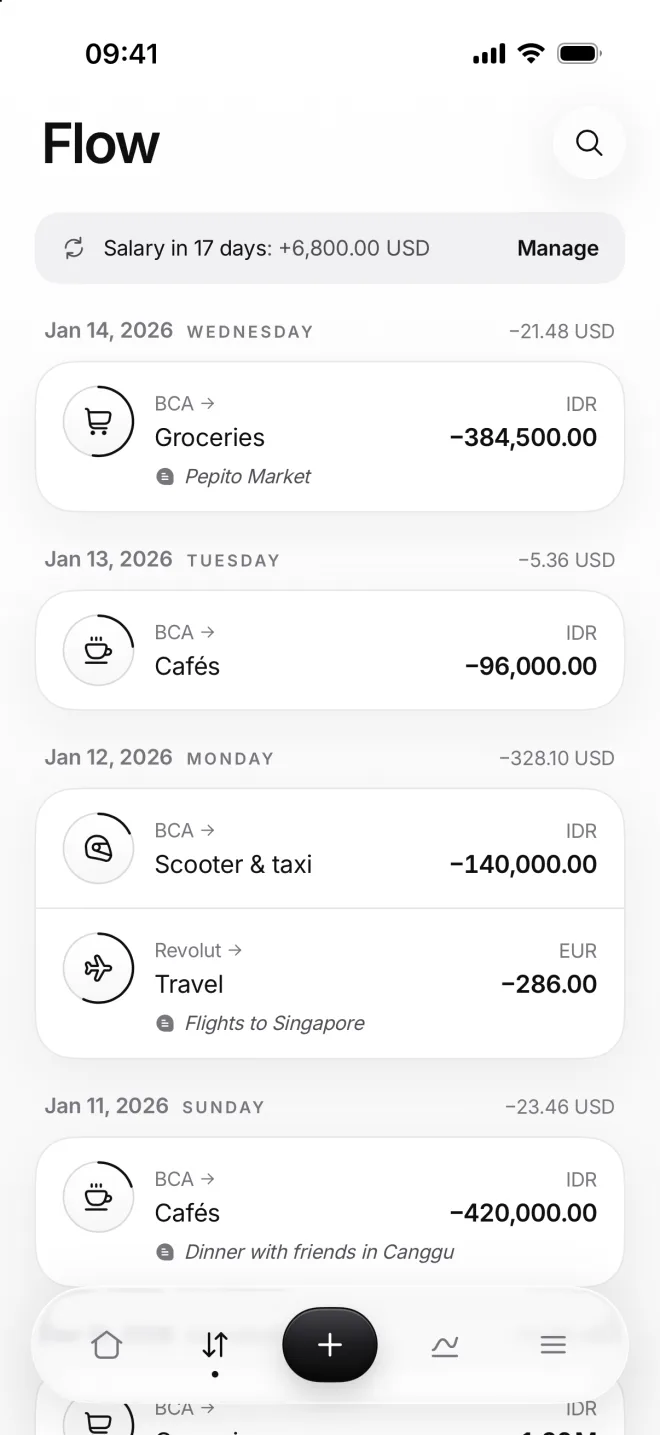
Flow: transactions by day
Stats: income and expenses chart and spending by category
Life happens

Bills, debts and goals.

The money that comes back every month, the money you lend to friends or borrow from them, and the money you’re saving up for something big.

Netflix in 3 days: −15.49 USDManage

Recurring transactions

Rent, salary and subscriptions are added on their day, with a reminder three days before.

BCA Loans
Kadek · 100.00 of 300.00 got back

Debts and loans

Who owes whom, how much is back and when it’s due. Pay back in parts, or simply forgive what’s left.

Vacation · 75.0% saved 950.00 USD left

Piggy bank

One goal at a time. Name it after your dream and watch it come closer with every transfer.

Investments

Watch your savings grow.

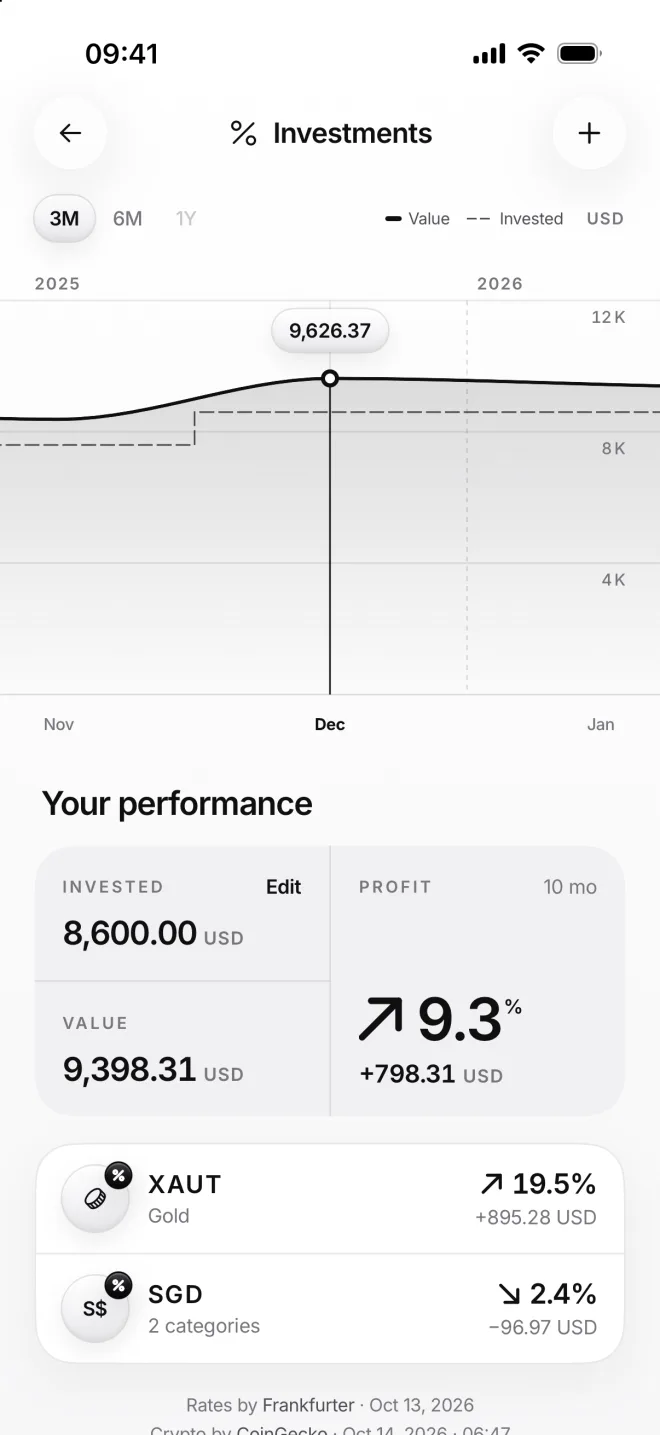
Keep money in another currency, gold or crypto? Mark it as an investment: moni shows what you put in, its value today and your profit.

Your buys and sells sit right on the price chart of each investment, next to the average price you paid.
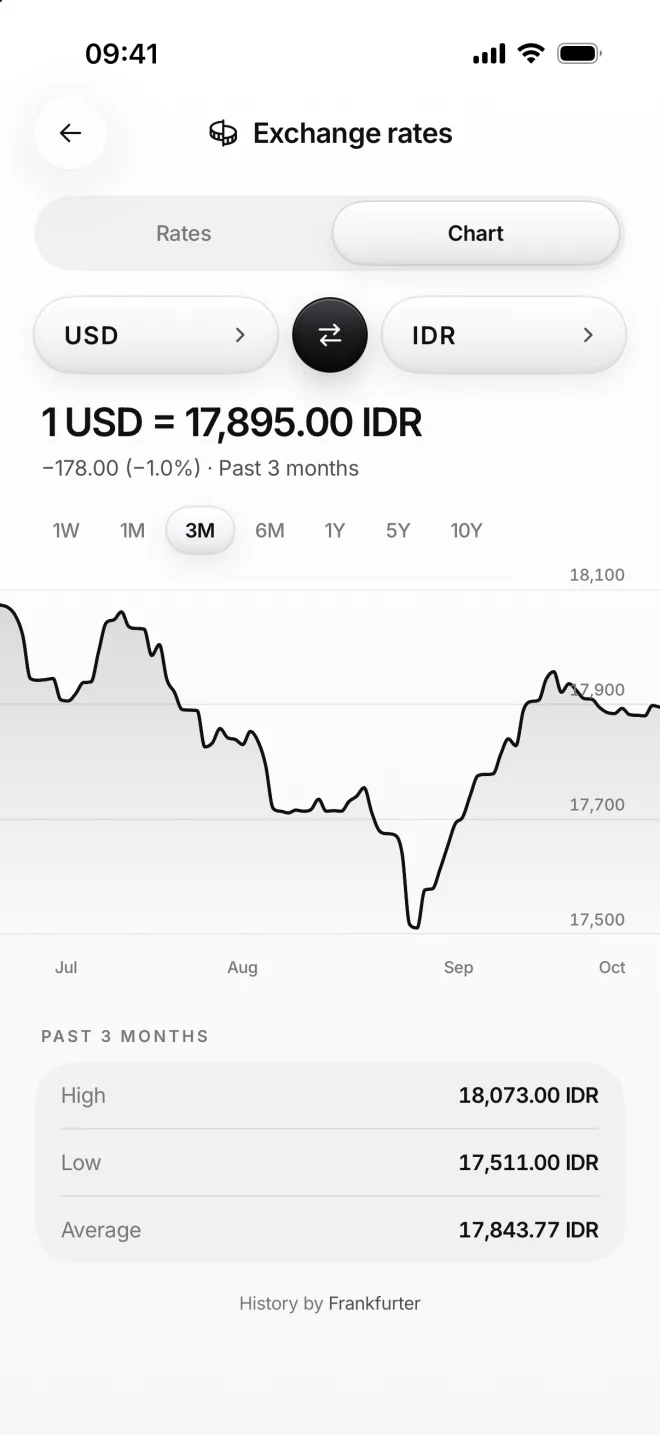
Exchange rates chart, USD to IDR
Investments: value, invested and profit
Privacy

Your money stays yours.

moni is built without accounts and without bank connections. Your finances live on your iPhone, and nobody else can read them. Not even us.

No accountNo sign-up, no email, no password to remember. Open moni and start in seconds.
Nothing to leakBank-linked apps share your spending with other companies. moni never sees your bank at all.
On your iPhoneYour data never sits on our servers. We don’t even have one.
Hide amountsOne tap hides every sum behind stars, for when someone is looking over your shoulder.
Face ID lockmoni can ask for Face ID, Touch ID or your passcode to open.
Back up your waySync with your own iCloud, instantly (on paid plans), or export a backup file whenever you like.
Languages

Speaks your language. 30 of them.

From English and Bahasa Indonesia to Japanese and Hindi. Dates, months and numbers follow your iPhone.

EnglishBahasa IndonesiaРусскийDeutsch EspañolFrançaisPortuguêsItaliano 日本語한국어简体中文繁體中文 TürkçeNederlandsPolskiУкраїнська Tiếng ViệtไทยSvenskaDansk NorskSuomiČeštinaSlovenčina MagyarRomânăΕλληνικάHrvatski CatalàBahasa Melayuहिन्दी
Home Screen widgetsYour balance, budget, rates and latest spending, right on the Home Screen of your iPhone.
Lock ScreenYour budget and expenses at a glance, right next to the clock.
One tap awayAdd a transaction from Control Center or the Action button.
Colors

Made to match your iPhone.

Pick your iPhone’s color, and moni repaints itself to match. Then give categories any Apple emoji.

+16others

Mix a color with light or dark to find your own moni.

moni Home in the chosen color
Color
☕
CoffeeNew expense category
FoodHome☕
🍏🚗🏠🎁🛵☕
Plans

Start free. Decide later.

Every plan is the full moni. And first, you live with it for 3 months, free.

Free trial
3 months free

All features and 300 receipt scans a month. Pick moni Try or moni Use after setup, and pay nothing today.

Most money apps7 days
moni3 months

A week shows you the buttons. Three months show you your money, your habits and your progress.

Why so generous?

Charts with your real numbersIn 3 months, the charts fill up with your real habits.
Months to compareSee which month went well, which didn’t, and why.
Your money in orderSet budgets, watch the Budgetometr move and feel the difference before you decide to keep using moni.
An honest decisionIf moni isn’t for you, you’ll know. If it is, you’ll know too.
Your data stays yoursWhen the free months end, you can still export all your data, as long as moni is on your iPhone.

Pick a plan to start. Try and Use begin with 3 months free.

moni Try

Monthly
$5.99
a month
  • 3 months free to start
  • All features
  • 300 receipt scans a month
  • Instant sync with your iCloud
  • Colors to match your iPhone
  • Any Apple emoji as a category icon
  • Cancel anytime

moni UseSave 44%

Yearly
$39.99
a year, just $3.33 a month
  • 3 months free to start
  • All features
  • 300 receipt scans a month
  • Instant sync with your iCloud
  • Colors to match your iPhone
  • Any Apple emoji as a category icon
  • Cancel anytime

moni Forever

One-time purchase
$99.99
once, no subscription
  • All features
  • 300 receipt scans a month
  • Instant sync with your iCloud
  • Colors to match your iPhone
  • Any Apple emoji as a category icon
  • No renewals, ever

Prices in US dollars; they may vary by country. Receipt scanning isn’t available in every country.

Questions

Good to know.

Do I need an account?
No. moni has no accounts at all: no sign-up, no email and no password to forget. Your plan is tied to your Apple Account through the App Store, so it follows you to a new iPhone.
Does moni connect to my bank?
No, and that’s on purpose. Bank connections need a company in the middle that sees your transactions. In moni you add them yourself, in a couple of taps, or snap the receipt.
Where is my data kept?
On your iPhone, and in your own iCloud if you turn on sync (on paid plans): always up to date, instantly. We have no server for your money and can’t see it. You can also export a backup or an Excel table anytime, even after your plan ends, while moni is on your iPhone.
How does receipt scanning work?
Your iPhone reads the text of the receipt. Our AI partner gets that text and the names of your categories, sorts the items and keeps nothing. Names and card numbers are removed first, and the photo itself never leaves your iPhone, so nobody but you ever sees it.
Which currencies does moni support?
165 currencies with rates from central banks and 50 cryptocurrencies, including bitcoin, ether and tokenized gold. Each category keeps its own currency; totals show in yours.
Do I pay anything to start?
No. After a short setup, pick moni Try or moni Use and confirm the free trial with Apple. Nothing is charged for 3 months, and you can cancel anytime before it ends.
What happens when the free months end?
Your plan just goes on: moni reminds you 3 days before the first payment. If you cancel it in App Store settings before then, moni asks for a plan when the months end. Nothing is ever deleted: you can export all your data while moni stays on your iPhone.
What does moni Forever mean?
You pay once, and it never renews. It works for as long as moni is offered and supports your iPhone, like any app you buy. And since moni lives on your iPhone, not on our servers, it keeps working there even if one day it’s no longer offered.
moni app icon

moni is coming to the App Store.

Made for people who earn in one currency, spend in another and save in a third: expats, nomads and everyone in between.

Coming soon to theApp Store